




 TV Operators
  Healthcare
  Digital Signage
  Hospitality
  Education



 TV Operators
  Healthcare
  Digital Signage
  Hospitality
  Education


IT and operational managers must manage increasingly complex and widespread device networks. Often numbering in the thousands across different geographies, these include Android TV boxes, digital signage systems, and various interactive media hubs. When technical problems occur, waiting for physical access to resolve them is no longer an option. Fast, effective remote diagnostics are essential for maintaining device performance, service continuity, and operational efficiency across large-scale deployments.
This article provides a comprehensive overview of the core strategies and tools for remote troubleshooting. You’ll learn how to monitor device performance in real time, automate problem detection, streamline support, and dramatically reduce device downtime. With this knowledge, your IT team can ensure continuous service, minimize disruptions, and operate at maximum efficiency.
Key Remote Tools for Faster Android TV Box Troubleshooting
Efficient support starts with the right toolkit. IT managers need systems that offer detailed visibility into device behavior, security status, and overall configuration across all devices in their fleet. Remote diagnostics provide the following critical infrastructure necessary to diagnose, respond to, and resolve problems from a centralized command center.

1. Real-Time Device Health Monitoring Dashboards
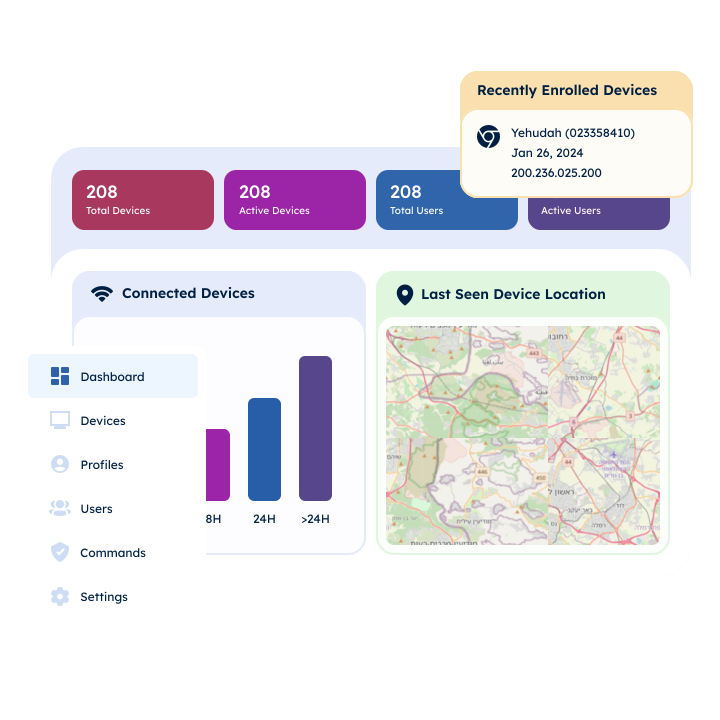
One essential tool in any remote diagnostics system is a real-time monitoring dashboard. These dashboards aggregate live data from every connected device and compare it against predefined performance baselines. The moment a device falls out of compliance, whether due to CPU overload, app failure, or network disruption, alerts prompt immediate attention.
2. Security and Compliance Watchdogs
Security watchdogs are another pillar of remote diagnostics. They continuously scan for breaches or abnormal behaviors, such as unauthorized network changes or deviations from geolocation policies.
3. Configuration Profiles for Device Groups
Configuration profiles enable IT teams to enforce consistency across all devices. Rather than configuring each device individually, administrators can deploy a single profile to groups of devices. These profiles ensure that updates, apps, and permissions remain uniform and current. They also eliminate misconfigurations and reduce the likelihood of user-generated errors.
Rapid Resolution: Leveraging Real-Time Status, Logs, and Remote Control
Beyond just detecting issues, remote diagnostics must also empower teams to resolve them quickly. Real-time insights play a crucial role in this process, giving operators the live data they need to make informed decisions.
Live device telemetry, such as battery status, network signal strength, and app usage, helps teams identify root causes at a glance. For instance, a recurring app crash may be tied to insufficient memory or a recent update. Instead of guesswork, teams can act based on concrete evidence.
Access to system logs further enhances this approach. Logs provide historical context for anomalies, shedding light on underlying issues that may not be obvious from the current device status alone. They also help verify whether earlier fixes were effective or if recurring issues still exist.
Remote control capabilities are equally vital. These allow technicians to view and interact with the device’s user interface directly from their control center. In doing so, they can replicate the issue firsthand, apply corrective actions in real time, or guide the end-user through resolution steps. This level of hands-on troubleshooting drastically reduces the time it takes to resolve support tickets.
Automated alerting mechanisms round out the real-time toolset. These systems notify IT teams the moment a threshold is crossed or a critical service fails. Even better, they can remediate issues automatically, resetting services or applying fixes before the end-user is even aware of an issue.
Unlocking Efficient Android Media Box Support With Radix’s Core Capabilities
The Radix platform brings all these remote diagnostics capabilities into a centralized, user-intuitive interface built for scale. Designed with the needs of IT and operational managers in mind, Radix offers tools that streamline troubleshooting and enhance performance monitoring across vast deployments of Android-based devices.
Radix’s integrated Remote Support and Customer Care modules deliver proactive and responsive issue resolution. One standout feature is the platform’s remote screen control and touch emulation. These enable support teams to mirror the device environment for direct interaction and a lower resolution time.

In addition, Radix features customizable dashboards that highlight real-time performance metrics and device health data. This level of remote diagnostics helps prioritize which devices need immediate attention and which can be addressed during regular maintenance cycles.
For ongoing visibility, Radix compiles device and application analytics, such as usage trends and historical performance records. These insights inform smarter IT decisions and help track the effectiveness of past interventions.
What’s more, Radix’s Watchdogs constantly safeguard security and functionality. These automated agents monitor for behavioral anomalies, policy violations, and unexpected configurations. When they detect threats, the system can enforce predefined actions, such as rolling back changes or alerting administrators.
To support mass deployments, Radix uses configuration profiles that administrators can create once and apply across thousands of devices. This ensures all devices operate under the same standards and can be monitored as a unified fleet.
Streamlining Support With Operational Efficiency
Operational efficiency isn’t just about saving time; it’s about reallocating resources more effectively and ensuring teams can scale without sacrificing quality. To accomplish this, Radix reduces dependency on manual interventions and enables proactive maintenance through automation.
Radix also continuously monitors for deviations in performance or behavior to lessen downtime and free up human resources for more strategic work. Auto-remediation features allow for near-instant fixes to recurring or predictable problems, reducing the time spent on repeat support tickets.
What’s more, centralized data exports let IT leaders analyze operational trends across their fleets, which improves both reactive support and proactive maintenance strategies. With one source of truth for device performance, support history, and policy compliance, decision-making becomes faster and more accurate.
Radix’s automation features eliminate time-consuming manual tasks. This eases the burden on support staff and shortens the mean time to resolution (MTTR). As a result, you see less downtime, more operational control, and better end-user experiences. Whether you manage hundreds or hundreds of thousands of devices, Radix gives your team the visibility and tools needed to resolve technical issues quickly and maintain system integrity.
Future-Proofing Your Device Management Strategy
Remote diagnostics aren’t just a fix for today’s issues; they’re a foundation for long-term operational scalability. As digital ecosystems grow and new challenges arise, a mature and intelligent diagnostics system is essential.
Radix empowers your team to shift from reactive troubleshooting to proactive operations management. By embedding monitoring, automation, and analytics into your support infrastructure, you gain the ability to manage thousands of devices with clarity, precision, and control.
If your support team is overwhelmed by the volume of troubleshooting requests or if you’re struggling to maintain consistent performance across a growing fleet of devices, it’s time to rethink your approach. Request a demo today to explore how Radix can help you optimize support, improve uptime, and bring operational excellence to your entire device fleet.
 Radix’s Security Infrastructure: What It Takes to Safeguard, Scale, and Simplify Device Management
  Scaling With Confidence: Choosing the Right Android Device Management Platform for a Large Device Fleet
  Cutting Costs and Improving Customer Support Efficiency With Smarter Device Management
  Device Manufacturers: Embed an Android Device Management App at the Firmware Level for a Competitive Edge
  How to Get Real-Time Device Analytics on Your Device Fleet Performance (And Why It Matters)