










Unlocking Business Opportunities Through Device Intelligence
See our all features

 TV Operators
  Healthcare
  Digital Signage
  Hospitality
  Education
TV Operators

Healthcare

Digital Signage

Hospitality
Education
Unlocking Business Opportunities Through Device Intelligence
See our all features

Unlocking Business Opportunities Through Device Intelligence
See our all features
 Platform
Core Platform
Platform
Core Platform
Gain centralized control and automation to maximize device fleet performance, reduce operational complexity, and streamline management.
Device Lifecycle
Easily manage every stage of your devices—from provisioning and configuration to app control and firmware updates.
Performance Analytics
Unlock actionable insights with real-time health monitoring, fleet analytics, and intelligent alerts to optimize uptime.
Security & Privacy
Secure devices and safeguard user data with comprehensive protection layers spanning device, platform, and privacy controls.
Customer Support
Enhance user satisfaction and minimize downtime with integrated remote technical support and proactive customer care.
Content Delivery
Engage audiences with seamless delivery of media, web content, and messaging—tailored for signage, hospitality, and more.
Solutions  Channel Partners
Empower your business with Radix's device management solutions.
Stand out with innovative tools, seamless integration, and new revenue opportunities.
Channel Partners
Empower your business with Radix's device management solutions.
Stand out with innovative tools, seamless integration, and new revenue opportunities.
 System Integrators
Expand your offering with Radix's end-to-end solution for device management. Partner with Radix for a top device management technology and superb service.
Partnerships
System Integrators
Expand your offering with Radix's end-to-end solution for device management. Partner with Radix for a top device management technology and superb service.
Partnerships Radix offers tailored device management across industries and markets. Scale efficiently, boost performance, and deliver exceptional user experiences.
 TV Operators
 Healthcare
 Digital Signage
 Hospitality
 Education


Radix Support
Welcome to our Customer Support page, where we’re committed to helping you get the most out of our products. Whether you need quick answers or in-depth assistance, we offer multiple ways to support you:
Guides & Blogs: Access our comprehensive guides and blogs for step-by-step instructions, tips, and best practices.
Webinars: Join our webinars to learn from experts and get live demonstrations of our solutions.
Ticket System: Need personalized help? Submit a ticket, and our support team will assist you promptly.

Open and Track Tickets
Access Radix support ticket.

Radix Device Management Guides

Stopping a Stream
Creating and Running a Stream
Radix MDM: Using the OTA Update Engine Command
How to Pull Log Files from the Terminal
Radix Device Management Platform: Installing SCManager
Radix Device Management Platform: Pausing a View
Radix Device Management Platform: Remote Device Security Features
Installing Apps on a Group with Group Management
Radix MDM: Creating Content for a Stream
Radix MDM: Stopping a View
Radix MDM: Editing and Running a View
Radix MDM: Creating a View in the Views Console
Radix MDM: Creating a Kiosk Device
Radix MDM: Deploying Device Settings Certificates
Radix MDM: Using a URL in a Stream
Radix MDM: Using Advanced URL Parameters To Create a View
Radix MDM: Creating a Device Profile
Radix MDM: Using Remote Execute to Adjust Device Settings
Radix MDM: Using the Smart Recovery Pro Application
Radix MDM: Applying Tags to Users and Devices
Radix MDM: Using the Smart Recovery Lite Application
Radix MDM: Using the Smart Recovery Duo Command
Radix MDM: Using the Views Command
Radix MDM: Advanced Messaging Command
Radix MDM: Using the Send Files Command
Radix MDM: Installing OTA Updates
Radix MDM: Two-Step Verification
Radix MDM: Installing the Viso Agent on ActivPanel Devices
Radix MDM: Launching Options for Apps in Kiosk Mode
Radix MDM: Using the Policies Command
Radix MDM: A Guide to Repository Items
Radix MDM: Collecting Logs of Remote Devices
Radix MDM: TeacherView Classroom Management App Overview
Radix MDM: Installing Radix MDM on Pico VR Devices
Radix MDM: Performing Firmware Updates
Radix MDM: Importing Tags and Labels
Radix MDM: Enrolling a Windows Device
Radix MDM: Applying Persistence to a Command
Radix MDM: Using Device Pairing
Radix MDM: Using the SmartRecovery Command Line Tool
Radix MDM: TeacherView Module – Create a New Classroom
Radix MDM: Undoing a Device Setting
Radix MDM: Using the Geofencing Option
Radix MDM: Repository Item Editing Options
Radix MDM: Device Groups and Filters
Radix MDM: Using the WOL (Wake On LAN) Command
Radix MDM: Android For Work (AFW) – Google EMM Enrollment
Radix MDM: Remote Software Installation
Radix MDM: Removing a Kiosk Option From a Device
Radix MDM: Combining Remote Input Events
Radix MDM: Executing Commands Remotely
Radix MDM: The Commands History Console
Radix MDM: Ad-hoc Remote Management and Control Session
Radix MDM: Recommended Network Requirements
Radix MDM: The Account Credits System
Radix MDM: Adding a New Console User
Radix MDM: Applying Commands and Operations on Devices
Radix MDM: Creating and Applying Triggers to Commands
Radix MDM: Installing an App Directly from the Google Play Store
Radix MDM: Remote Control of Devices
Radix MDM: Resetting the Authentication Token
Radix MDM: Using the Apple VPP for Installing Apps
Radix MDM: Removing Google Accounts from a Device
Radix MDM: Removing and Reenrolling a Device
Radix MDM: Creating a New Account and Enrolling Devices
Installation of the Smart Recovery App
Radix MDM: Remote Input and Touch Events
Radix MDM: Enrolling an Apple Device
Radix MDM: Enrolling a Chrome Device
Radix MDM: Enrolling an Android Device
Radix MDM: Adjusting Device Settings
Radix MDM: Creating and Using a Workflow
Radix MDM: Registering a New Account
Radix MDM: Apple DEP/VPP MDM Account Pairing
Radix MDM: Using the Overview Dashboard
How to Translate Radix Language XML Files
SmartRecovery: Radix Reload Manual Activation
SmartRecovery: Radix Reload on an SSD drive
SmartClass Student Activation
Radix for Manufacturers
Access Radix Embedded portal
Manufacturer Partners Portal access. Here, you’ll find essential resources for integrating Radix into your devices, including detailed firmware embedding instructions, hardware requirements, and Google certification documentation. Access everything you need to ensure a smooth and successful partnership with us.


Experience Radix in Action - request a Radix demo!
Ready to see how Radix can revolutionize your device management? Request a personalized demo now and watch our powerful platform tackle your unique challenges. Our experts will guide you through the features that matter most to your business. Don’t just imagine the possibilities – see them firsthand!
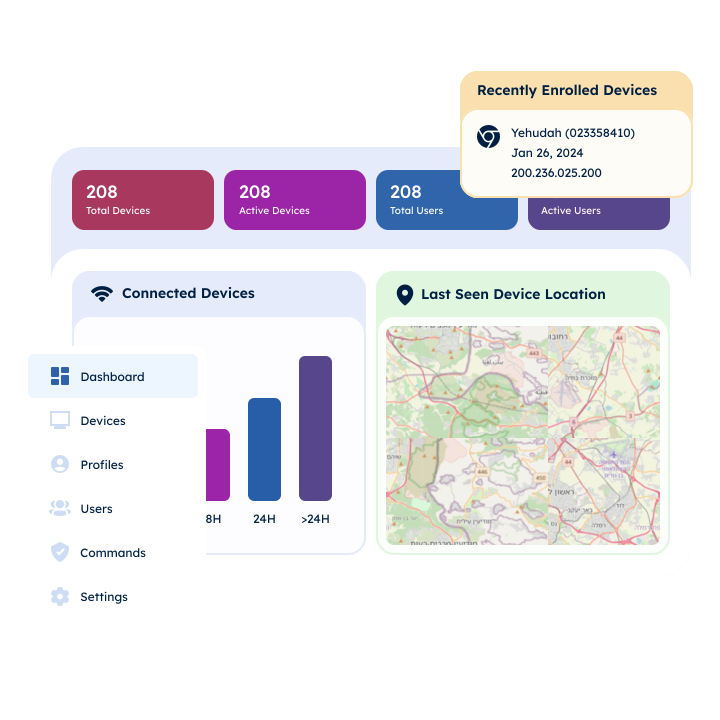
Experience Radix Live: Demo & Q&A Webinar
Join us for an exclusive inside look at our cutting-edge platform. Get a live demo, a comprehensive introduction, and participate in an interactive Q&A session. See our solution in action. Secure your place now!